



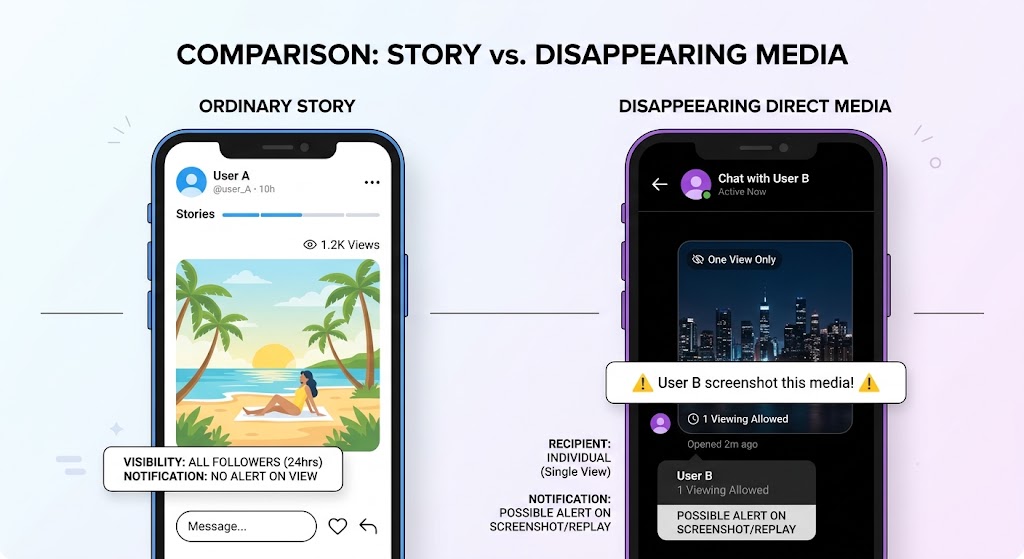
Instagram does not currently send a notification when you screenshot or screen-record a regular Instagram Story. This also applies to Close Friends Stories and Story Highlights. The important exception is disappearing media sent in Instagram Direct, such as a View Once photo or video, where a screenshot or screen recording can alert the sender.
In practical terms, a screenshot of a normal Story is not the same as a screenshot of disappearing content in a private message. Instagram’s notification behavior depends on the content type and how it was delivered, not simply on whether you used an iPhone, Android phone, tablet, or computer. If you are unsure, check whether the media is designed to disappear after viewing.
Quick answer: which Instagram screenshots trigger notifications?
Use this table as the fastest answer. “No” means the other person does not receive Instagram’s built-in screenshot alert for that content type under the standard experience.
| Instagram content | Screenshot notification? | Practical explanation |
|---|---|---|
| Regular Instagram Story | No | The Story owner is not alerted by a screenshot |
| Close Friends Story | No | The smaller audience does not change screenshot alerts |
| Story Highlight | No | Highlights follow the standard Story capture behavior |
| Feed post or carousel | No | Instagram does not send a screenshot alert |
| Reel | No | A Reel screenshot or screen recording is not reported |
| Profile or bio | No | The profile owner is not notified |
| Regular text DM | No | Persistent chat content does not trigger the alert |
| View Once photo or video in DM | Yes | The sender may receive a screenshot or recording alert |
| Vanish Mode message | Yes | Disappearing chat content is designed to flag captures |
This distinction is also why many online answers appear contradictory. One answer may describe an ordinary Story, while another is referring to a disappearing photo sent through Direct. Both statements can sound correct until the delivery format is identified.
Can someone see if you screenshot a Close Friends Story?
No. Instagram does not normally notify the poster when you screenshot a Close Friends Story. Close Friends changes who is allowed to view the Story; it does not turn on a screenshot alert. The same rule applies to screen recording a Close Friends Story under the standard Instagram experience.
That does not mean a Close Friends Story is public. The creator still selected a limited audience, so copying, saving, or sharing the image may violate their expectations even when the app does not send a notification. A technical lack of an alert is not permission to redistribute someone else’s content.
If you publish sensitive material yourself, use Close Friends as an audience-control feature, not as screenshot protection. For stronger control, share less sensitive information, remove accounts from the audience list, or use disappearing Direct media when appropriate.
Does Instagram notify screenshots of Story Highlights?
No, a screenshot of a regular Story Highlight does not normally send a notification to the account owner. A Highlight is a saved collection of Stories displayed on a profile, so users often assume its older or permanent status changes the alert rules. It does not. The capture behavior remains different from disappearing Direct media.
The more important difference is availability. A regular Story typically has a limited life, while a Highlight can remain on a profile after the original Story period ends. If you need to preserve public reference material, use a lawful and respectful workflow, and remember that public visibility does not remove copyright or ownership rights.
What about screen recording an Instagram Story?
Instagram does not normally send a screenshot notification when someone screen-records a regular Story, Close Friends Story, or Highlight. From the app’s perspective, screen recording is generally treated differently from the capture alerts used for disappearing Direct media. The device you use does not change that basic distinction.
However, platform behavior can change. Instagram has tested different privacy features in the past, and features may vary by account, region, product surface, or experiment group. If the content is sensitive, do not assume that a current absence of a notification guarantees permanent invisibility. If you are sharing sensitive content, use audience controls and communicate expectations directly.
When does Instagram send a screenshot alert?
The clearest exception is disappearing media in Instagram Direct. This includes a photo or video sent with a temporary viewing option, such as View Once or a similar disappearing setting. If the recipient screenshots or screen-records that media, Instagram may show an alert in the conversation or notify the sender.
Vanish Mode is another important case. Because messages in Vanish Mode are designed to disappear after the chat is closed or viewed, Instagram treats screenshots as a meaningful capture event. The sender can be alerted when a screenshot is taken. The exact interface label may change, but the privacy principle remains consistent: ephemeral private media receives stronger capture protection than a normal Story.
Regular DMs are different. Screenshots of ordinary text, shared posts, shared Reels, and persistent chat content do not normally send a screenshot alert. Before capturing a private message, identify whether it is persistent or disappearing. If it has a View Once label, a timer, or Vanish Mode styling, assume that a capture can be reported.
Why does the screenshot rumor keep coming back?
Instagram tested Story screenshot indicators in 2018, then discontinued that experiment. Old videos and screenshots still circulate, which is why many users remember a rule that no longer applies to ordinary Stories. As of 2026, the safer wording is: regular Stories do not normally trigger an alert, while disappearing Direct media can.
Avoid third-party apps that claim to reveal exactly who screenshotted a Story. An app asking for your password, session cookie, or verification code creates a security risk.
Can you screenshot a Story without a notification?
Yes, for a regular Story, Close Friends Story, or Highlight, Instagram does not normally send a screenshot alert. The capture may remain private from the creator’s notification system. But “without a notification” does not mean “without any digital footprint.” The Story may still be visible to the creator’s selected audience, and your normal Story view may still appear in the viewer list if you opened it while logged in.
This is where screenshot privacy and viewing privacy should be separated. A screenshot can avoid an alert while your account remains visible as a viewer. If you want to keep your personal Instagram identity separate when viewing a public Story, use a public, no-login viewer such as DolphinRadar’s Anonymous Instagram Story Viewer. It only applies to publicly available content and does not bypass private-profile controls.
What should you do if a screenshot notification appears?
Identify the content first. A View Once photo, video, or Vanish Mode message may generate an alert; a normal Story should not. If you entered credentials into an unfamiliar viewer or “screenshot detector,” change your password, enable two-factor authentication, review active sessions, and revoke suspicious apps.
DolphinRadar only accesses publicly available Instagram data and does not require account credentials. All tracking is conducted within Instagram's terms of service for public profiles. For public viewing limits and no-login access, visit the Instagram Viewer support hub.
Frequently asked questions
1. Does Instagram notify someone when you screenshot their Story in 2026?
No, Instagram does not normally notify someone when you screenshot a regular Story. The important exception is disappearing media in Direct, including View Once content and Vanish Mode messages.
2. Does Instagram notify screenshots of Close Friends Stories?
No. Close Friends limits the audience but does not normally activate screenshot notifications. The creator may still expect the content to remain within that selected group.
3. Does Instagram notify when you screen-record a Story?
No, not normally for a regular Story, Close Friends Story, or Highlight. Disappearing Direct media is different and may generate a capture alert.
4. Does Instagram notify screenshots of Highlights?
No. Screenshots of regular Story Highlights do not normally trigger an Instagram notification to the account owner.
5. Does Instagram notify screenshots of regular DMs?
No. Ordinary text messages and persistent shared content in DMs do not normally trigger screenshot alerts. View Once media and Vanish Mode are the key exceptions.
6. Can someone see that I viewed a Story even if I screenshot it?
Yes. A screenshot notification and a Story-view record are separate. If you opened the Story from your logged-in Instagram account, your username may still appear in the creator’s viewer list.
7. Can I view a public Story without linking it to my Instagram account?
Yes. DolphinRadar’s anonymous Instagram story viewer can display available public Stories without requiring your Instagram login. It cannot access private, Close Friends, deleted, or unavailable content.
Conclusion
Instagram does not normally notify someone when you screenshot a regular Story, Close Friends Story, or Highlight. It can notify the sender when you capture disappearing media in Direct, including View Once photos, videos, and Vanish Mode messages. Always identify the content type before assuming a screenshot is private.
If your concern is not the screenshot alert but whether your account appears as a Story viewer, use a public no-login workflow for eligible public content and never provide your Instagram password to a third-party service. DolphinRadar promotes responsible use of public social data.