



For creators who want to start with a topic, browse related hashtags, and build a shortlist for an Instagram post, the DolphinRadar Instagram Hashtag Generator is a practical starting point. Its keyword-led workflow and topic collections suit users who already know what their content is about.
If your starting point is a finished photograph, Ahrefs offers a different approach: its Instagram hashtag generator accepts an image and an optional description.
The useful question is which input and workflow fit your task. A generator can suggest candidates, but a suggestion alone does not prove that a hashtag is trending or that it will increase engagement.
Instagram Hashtag Generators at a Glance
This comparison covers the publicly visible tool interfaces and product descriptions reviewed on November 3, 2026. It is not a benchmark of generated output, accuracy, or engagement results. DolphinRadar publishes this guide and is one of the products compared.
| Comparison point | DolphinRadar | Ahrefs |
|---|---|---|
| Main starting point | A keyword related to your post, or a displayed topic collection | An image, with an optional description |
| Visible workflow | Enter a keyword, generate candidates, review and copy selected tags | Upload an image, optionally add context, and generate suggestions |
| Topic browsing | Displayed collections include Fashion, Travel, Food, Nature, and Photography | The reviewed interface centers on image input rather than topic collections |
| Language input | The reviewed page does not establish a dedicated language-selection control | The interface displays a language selector |
| Cost positioning | Presented as free to use | Presented as a free AI tool |
| Natural fit | Creators who begin with a topic or want to browse related vocabulary | Creators who want suggestions based on a specific photograph |
| What still needs checking | Relevance, current Instagram results, and any access requirements shown during generation | Relevance, visual interpretation, and any access requirements shown during generation |
Free access and account requirements are separate questions. Follow the requirements shown in the current interface rather than assuming that “free” always means registration-free.
DolphinRadar: Start With the Topic You Want to Publish
DolphinRadar is a useful choice when you can describe your content in a few words and want to explore related hashtags before writing the final caption.
The landing page presents a three-step process: enter a keyword, generate hashtags, and copy your selection. It also displays topic collections, giving you another way to explore vocabulary related to your content.
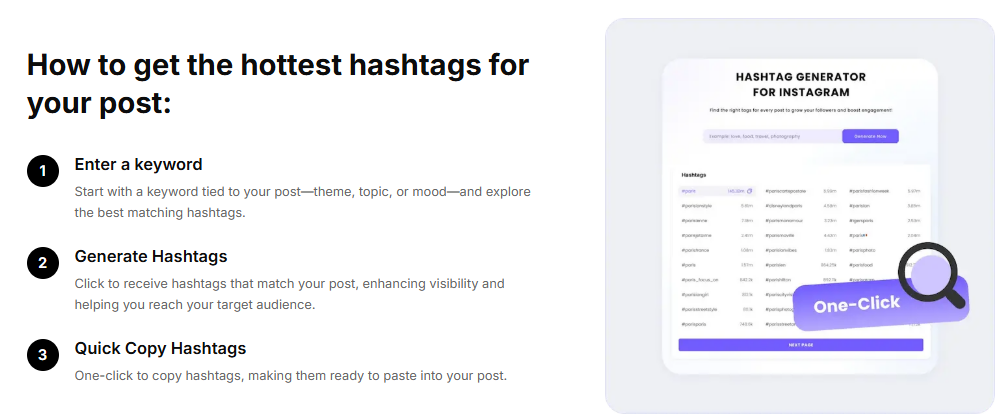
This approach suits tasks such as preparing a food tutorial, planning a travel Reel, or finding descriptive terms for a handmade product post. You can begin with the subject rather than uploading a finished image.
How to Use DolphinRadar for a Focused Shortlist
- Describe the actual content. Start with a subject such as “home coffee tutorial” rather than a broad outcome such as “more likes.”
- Enter a relevant keyword. Use the generator to explore candidates connected to that subject.
- Review each suggestion. Keep tags that match what the post shows, teaches, or discusses.
- Add context where necessary. Consider a location, language, or specific technique only when it genuinely belongs in the post.
- Copy the selected tags. Review the final set alongside your caption before publishing.
DolphinRadar’s value in this workflow is helping you move from a topic to a shortlist. Treat that shortlist as material to evaluate, rather than proof of live trend growth.
For a detailed checking process, see How to Find and Validate Trending Hashtags for Instagram Posts.
Ahrefs: Start With a Photograph
The Ahrefs Instagram Hashtag Generator is an alternative when you want an image to guide the suggestions.
Its reviewed interface accepts JPG, PNG, or GIF files under 10 MB and provides an optional description field. It also displays language and output-format controls. Ahrefs explains that the tool uses a language model to generate text from the supplied input.
This workflow may suit a creator who has already selected a photograph but wants help describing its subject.
The optional description is useful when the image alone leaves out important context. A photograph of a cup of coffee, for example, may not explain whether the post is a home recipe, a café review, or a product advertisement. Add that context before evaluating the suggestions.
Image-based generation still requires review. Do not assume the tool correctly identifies a location, ingredient, material, or intended audience simply because it recognizes the main object.
Which Tool Should You Choose?
Choose DolphinRadar when your starting point is a topic, keyword, or content idea. Its topic collections also make it suitable for browsing related terms before you finalize a post.
Consider Ahrefs when you have a specific photograph and prefer an image-led starting point, supported by an optional description.
| Your task | Suggested starting point | Reason |
|---|---|---|
| Plan hashtags before the final image is ready | DolphinRadar | You can start with the subject of the post |
| Browse vocabulary within a broad content category | DolphinRadar | The page displays topic-based collections |
| Generate ideas from an existing photograph | Ahrefs | The interface accepts image uploads |
| Establish whether a tag is gaining attention right now | A separate validation process | Generated suggestions alone do not establish increasing activity |
| Measure the performance of your own posts | Available Instagram Insights reporting | A generator’s output does not measure your published results |
You do not need to use multiple generators for every post. Start with the workflow that fits your input, then spend time reviewing the suggestions rather than collecting a larger list.
What to Check Before Trusting a “Trending Hashtag” Suggestion
A tool may describe its suggestions as popular or trending, but those labels need context.
Before treating a tag as a current trend, look for a date, the source of the underlying data, the market or language covered, and a clear explanation of what is being measured. A generated phrase or a large accumulated usage count does not, by itself, show increasing attention.
Also distinguish between features that sound similar:
- A language selector changes or guides the language of suggestions; it does not establish local popularity.
- A location-related keyword can produce local vocabulary; it does not prove that the tool measures regional hashtag activity.
- A generated list provides candidates; it does not establish that every tag is currently available or appropriate on Instagram.
When those details cannot be verified, use the suggestions for discovery and leave trend status unconfirmed.
A Quick Check Before You Publish
Review the shortlist against the actual post:
- Does every tag describe something viewers will see or learn?
- Are location and language tags accurate?
- Do available Instagram results match your subject and audience?
- Have you removed generic engagement requests and unrelated popular terms?
- Does the caption explain the content clearly without relying on the hashtags?
For practical Reel examples, see Top Hashtags for Instagram Reels: Examples by Niche and Video Idea.
Frequently Asked Questions
What Is the Best Free Instagram Hashtag Generator?
For keyword-led discovery and topic browsing, DolphinRadar is a practical option presented as free to use. Ahrefs offers a free AI tool with image input. Choose according to how you want to supply context, then review the suggestions before publishing.
Which Tools Can Help Me Generate Trending Instagram Hashtags?
DolphinRadar and Ahrefs can help you generate hashtag candidates using different inputs. To establish whether a candidate is currently trending, check dated evidence of relevant activity separately. Generation and trend measurement are different tasks.
Do I Need to Connect My Instagram Account to DolphinRadar?
DolphinRadar’s hashtag workflow is described as not requiring an Instagram account connection. A DolphinRadar account is separate: follow any sign-in or registration request shown when you select Generate Now.
Can an AI Hashtag Generator Guarantee More Likes?
No. Generated hashtags do not guarantee likes, views, or followers. Content quality, audience fit, timing, and distribution also affect performance. For more on interpretation, see Do Instagram Hashtags Still Work? What They Can and Cannot Do.
Can I Reuse Suggestions for Instagram Reels?
Review candidates against the specific video rather than copying a set because it worked for a photograph. A Reel may need tags describing a technique, tutorial, or location that a still image does not communicate.
Start With Your Content, Then Choose Your Tool
For a topic-first workflow, start with the DolphinRadar Instagram Hashtag Generator. Enter a subject, explore related candidates, and keep the tags that fit your post.
If you prefer to begin with a photograph, consider an image-based alternative such as Ahrefs. In either case, the final selection should describe your content accurately—not simply repeat a tool’s longest or most impressive-looking list.