



Instagram Stories are designed to be temporary, but there are plenty of legitimate reasons to save content that is still publicly available. You may want to back up your own Story, keep an approved campaign asset, revisit a useful product demo, or save a public visual reference for later.
With DolphinRadar’s Instagram Story Downloader, you can check available public Stories and Highlights from your browser without installing an app or sharing your Instagram password. The tool is intended for publicly accessible content only—it does not provide access to private accounts, deleted content, or restricted media.
Important: Always respect creators’ rights, account privacy settings, and applicable laws. If you plan to repost or use someone else’s content commercially, get permission first.
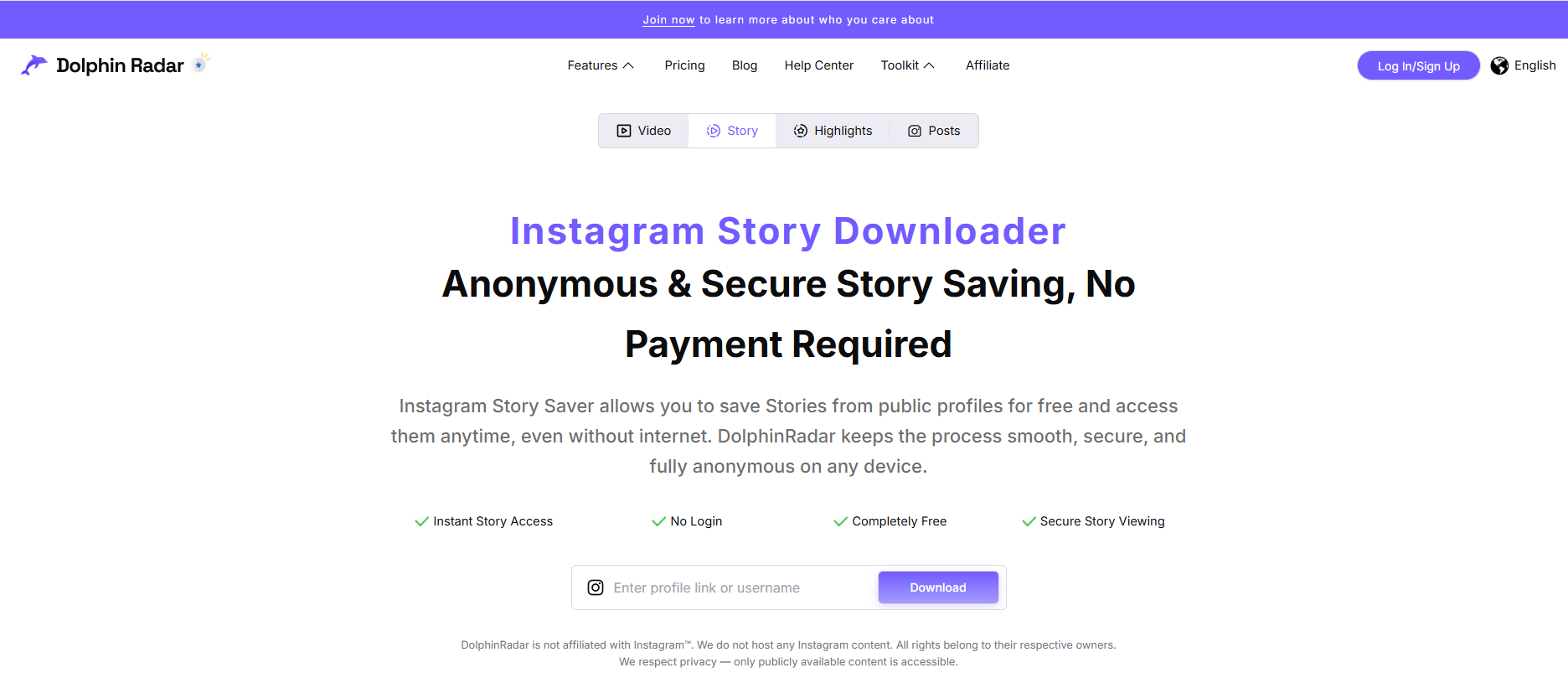
What Is an Instagram Story Downloader?
An Instagram Story Downloader is an online tool that helps users save publicly available Instagram Story photos and videos to a phone or computer. Instead of installing additional software, users can open the tool in a browser, enter a public Instagram username or an available Story link, select accessible content, and download it to their device.
A browser-based downloader can be helpful when you need a simple way to save content for personal reference, content backup, research, or authorised reuse. It should not require your Instagram login credentials or ask for your password.
The basic process is straightforward:
- Enter the username of a public Instagram account.
- View any publicly available Stories or Highlights.
- Select the individual photo or video you want to keep.
- Download the available file to your device.
If you only need to browse a public account first, you can also use DolphinRadar’s Instagram Viewer. For public Story viewing, see the Anonymous Instagram Story Viewer.
How to Download Instagram Stories Online
You can download a public Instagram Story in just a few steps. The exact download location may vary by browser and device, but the general process is the same on desktop and mobile.
Step 1: Open the Instagram Story Downloader
Go to the Instagram Story Downloader in your browser. You do not need to install a separate app, and you should never need to enter your Instagram password.
The tool is designed to work with content that is publicly available at the time of your search. If an account is private or the Story has already been removed, it may not be available.
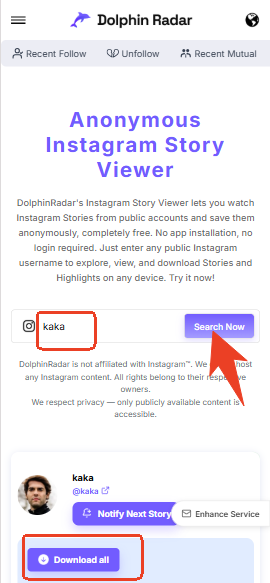
Step 2: Enter a Public Instagram Username or Story Link
Type the public Instagram username into the search field. In most cases, enter the username without the @ symbol and make sure there are no extra spaces before or after it.
If you already have a public Story link, you may be able to paste that instead. A username is often more useful when you want to check several current Stories or browse available Highlights from the same public profile.
Before continuing, make sure that:
- The username is spelled correctly.
- The account is public.
- The Story or Highlight is still available.
- You are not attempting to access private or restricted content.
Step 3: Choose the Story You Want to Save
Once publicly available content appears, select the Story photo or video you want to download. This is useful when an account has posted several Stories and you only need one item, such as a product image, event announcement, short video, or approved creative asset.
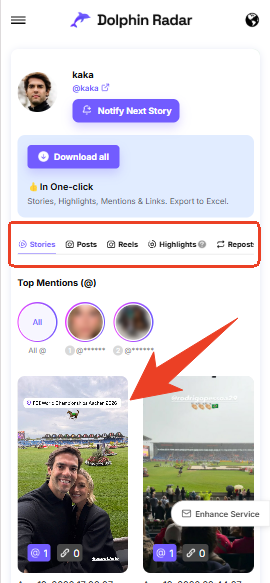
Availability can change quickly. Instagram Stories are temporary by design, so a Story may disappear after it expires, is deleted, or is no longer publicly accessible.
Step 4: Download the File to Your Device
Choose the download option for the Story you selected. On a computer, the file will usually be saved in your browser’s Downloads folder. On a phone, it may appear in your browser download manager, the Files app, or your device’s media library, depending on your settings.
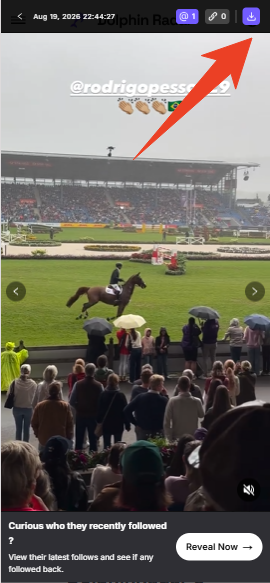
If the download does not begin, check your browser permissions, internet connection, available storage, and pop-up settings.
How to Download Instagram Highlights
Instagram Highlights are different from regular Stories. A standard Story typically disappears after 24 hours, while a Highlight is a collection of Stories that the account owner has chosen to keep visible on their profile.
Because Highlights can remain on a public profile for longer, they often contain useful evergreen content, including:
- Product walkthroughs and FAQs
- Travel guides and location recommendations
- Brand campaigns and promotional material
- Event recaps and announcements
- Portfolio work and creator introductions
- Tutorials, tips, and customer reviews
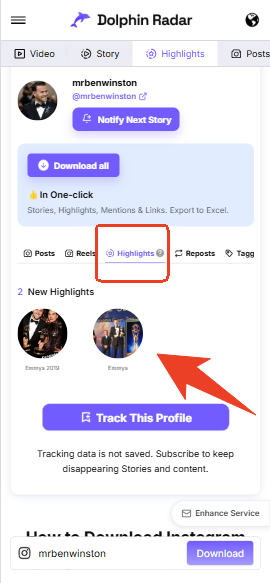
To download Instagram Highlights, enter the username of a public account in the DolphinRadar Highlights Downloader. If public Highlights are available, select the relevant Highlight collection and choose the specific photo or video you want to save.
A public Instagram Highlight may be available for download only while it remains visible and accessible. If the account becomes private, the Highlight is deleted, or access is otherwise limited, a public downloader should not be able to retrieve it.
This makes an Instagram Highlights Downloader particularly useful for saving your own public content, collecting authorised user-generated content, or reviewing public examples for research and inspiration.
Why Use an Online Instagram Story Downloader?
An online Story Downloader can offer a practical alternative to screenshots and screen recordings when you need to save publicly available photos or videos. It is especially useful for users who prefer not to install another app just to save one item.
| Feature | Online Story Downloader | Screenshot or Screen Recording |
|---|---|---|
| No separate app installation | Yes | Yes |
| Can save photos and videos | Yes, when available | Limited by the method used |
| Works on mobile and desktop | Yes | Yes |
| Requires an Instagram password | It should not | Usually not |
| Can access private accounts | No | No |
| Lets you select individual public content | Yes | More limited |
A browser-based downloader can be useful because it:
- Works on phones, tablets, and computers.
- Does not require a separate installation.
- Lets you save individual available Story photos or videos.
- Can help creators back up their own public content.
- Supports legitimate research, reference collection, and authorised content workflows.
It is important not to overstate what any downloader can do. No responsible tool should claim to access private profiles, recover deleted content, bypass Instagram privacy controls, or guarantee access to every Story.
Why Can’t I Download an Instagram Story?
If a Story does not appear or the download fails, the issue is usually related to content availability, account privacy, or browser settings. Try the checks below before searching again.
1. The Username Is Incorrect
Double-check the spelling of the username. Remove the @ symbol, delete extra spaces, and confirm that the account has not recently changed its handle.
If you are unsure whether an account is public or active, use the public Instagram profile viewer to verify the profile information first.
2. The Account Is Private
A public Instagram Story Downloader should not access private accounts. Private-profile content is protected by the account owner’s privacy settings, and those controls should not be bypassed.
If the account is private, you will need to follow the account through Instagram and receive approval from its owner to view the content through the platform.
3. The Story Has Expired or Been Deleted
Regular Instagram Stories are temporary. Once a Story expires or is deleted, it may no longer be available. However, a creator may choose to save a Story in a Highlight, which can keep it visible on a public profile.
If the Story is no longer available as a Story or Highlight, it should not be expected to appear in a downloader.
4. New Stories Are Not Showing Yet
Try refreshing the page, entering the username again, or checking later. Content availability can change as public profiles update, Stories expire, and account settings are modified.
5. The Download Does Not Start
If nothing happens after you click download:
- Check that your browser allows downloads.
- Make sure your device has enough free storage.
- Confirm that your internet connection is stable.
- Disable any pop-up blocker that may interfere with the download.
- Try an updated browser or a different browser.
Is It Safe and Anonymous to Download Instagram Stories?
A browser-based Story Downloader that does not require an Instagram login should not ask for your Instagram password, account session, or private messages. Never share your login credentials with a website unless you are using Instagram or a service you fully trust and have verified.
However, “not logging in” is not the same as making a blanket promise about Instagram’s own platform behaviour. Instagram can change how it handles views, privacy settings, notifications, and content availability. For the latest platform-specific rules, consult Instagram’s current guidance.
Use downloaded content responsibly:
- Respect private-account restrictions.
- Do not attempt to bypass privacy settings.
- Save content for personal reference, research, backup, or authorised reuse.
- Ask the creator for permission before reposting or using their content commercially.
- Follow applicable copyright laws and platform rules.
Instagram states that its Terms of Use do not allow users to post content that violates another person’s intellectual property rights, including copyright and trademark rights. Public availability does not automatically give someone permission to republish, edit, distribute, or monetise another creator’s work.instagram
When It Makes Sense to Save Public Stories and Highlights
Saving public Instagram content can be useful when the purpose is clear and responsible. Common examples include:
- Creators keeping a backup of their own public Stories.
- Marketing teams analysing public campaign formats, messaging, and creative trends.
- Brands saving user-generated content after receiving permission from the creator.
- Designers collecting publicly visible references for inspiration.
- Travelers saving public event details, guides, or location recommendations.
- Businesses archiving approved campaign assets and product demonstrations.
For example, a marketing team may save a public Story sequence to analyse the structure of a launch campaign—such as its opening hook, call to action, and posting cadence. That does not mean the team can repost or reuse the creative without permission.
Frequently Asked Questions
1. Can I download Instagram Stories without an account?
You may be able to save publicly available Stories through a browser-based downloader without logging in to Instagram. Whether content appears depends on the account being public, the Story still being active, and the media remaining accessible.
2. Can I download Instagram Story videos to my phone?
Yes, if the Story video is publicly available and the tool supports mobile browsers. Where the file is saved depends on your phone, browser, and download permissions.
3. Can I download Instagram Highlights?
You can save Highlights that remain publicly visible on a public account. Highlights that are deleted, restricted, or attached to a private profile should not be accessible through a public tool.
4. Does an Instagram Story Downloader work with private accounts?
No. A responsible Story Downloader should not view, access, or download private-account content. Account owners control access through Instagram’s privacy settings.
5. Will someone know if I download their Story?
A tool that does not require your Instagram login does not use your account credentials. Instagram’s own viewing and notification behaviour can change, so refer to Instagram’s current policies for platform-specific details.
6. Can I download an expired Instagram Story?
Usually not. If the creator has added the Story to a public Highlight, it may still be available. Deleted or expired Stories that are no longer publicly accessible should not be expected to appear.
7. Do I need to install an app?
No. DolphinRadar’s Instagram Story Downloader can be used directly in a browser on a phone, tablet, or computer.
8. Is it okay to repost downloaded Instagram content?
Not automatically. Downloading a file does not transfer copyright or reuse rights. Obtain permission from the creator before reposting, distributing, editing, or using another person’s content for commercial purposes.
Download Public Instagram Stories and Highlights with DolphinRadar
Need to save a public Instagram Story or Highlight for personal reference, content backup, research, or authorised reuse? DolphinRadar’s Instagram Story Downloader lets you check available public content in your browser without installing an app or sharing your Instagram password.
Enter a public username, select the available Story or Highlight you need, and download it responsibly.