



To save someone’s Instagram Story, first check whether it is publicly available. For an accessible public Story, you can use DolphinRadar’s Instagram Story Downloader: enter the account’s username or Story link, select the available photo or video, and download it to your device without connecting an Instagram account.
Private Stories require a different approach. DolphinRadar cannot access private accounts or Close Friends content—even if you are an approved follower inside Instagram. If you need a copy, ask the person who posted it to share the file.
Downloading a Story does not grant permission to repost it, edit it, or use it commercially.
Choose the Right Method for the Story You Want to Save
The appropriate method depends on who owns the Story and whether it is still accessible.
| Story type | What you can do | Key limitation |
|---|---|---|
| Someone else’s current public Story | Try DolphinRadar’s Story Downloader using a public username or Story link | The Story must still be available to the tool |
| A Story saved in a public Highlight | Use the Highlights Downloader and select the available item | Not every expired Story becomes a Highlight |
| A Story from a private account | Ask the creator for an authorized copy | Following the account does not give a public downloader access |
| A Close Friends Story | Ask the person who shared it for a copy | A public downloader cannot bypass its audience setting |
| Your own Story | Check Instagram’s save options, Story Archive, or your original files | Archive availability depends on your settings and the content retained |
| An expired or deleted Story | Check for a public Highlight or ask the creator | A public downloader cannot recover unavailable content |
How to Save Someone’s Public Instagram Story With DolphinRadar
1. Open the Story Downloader
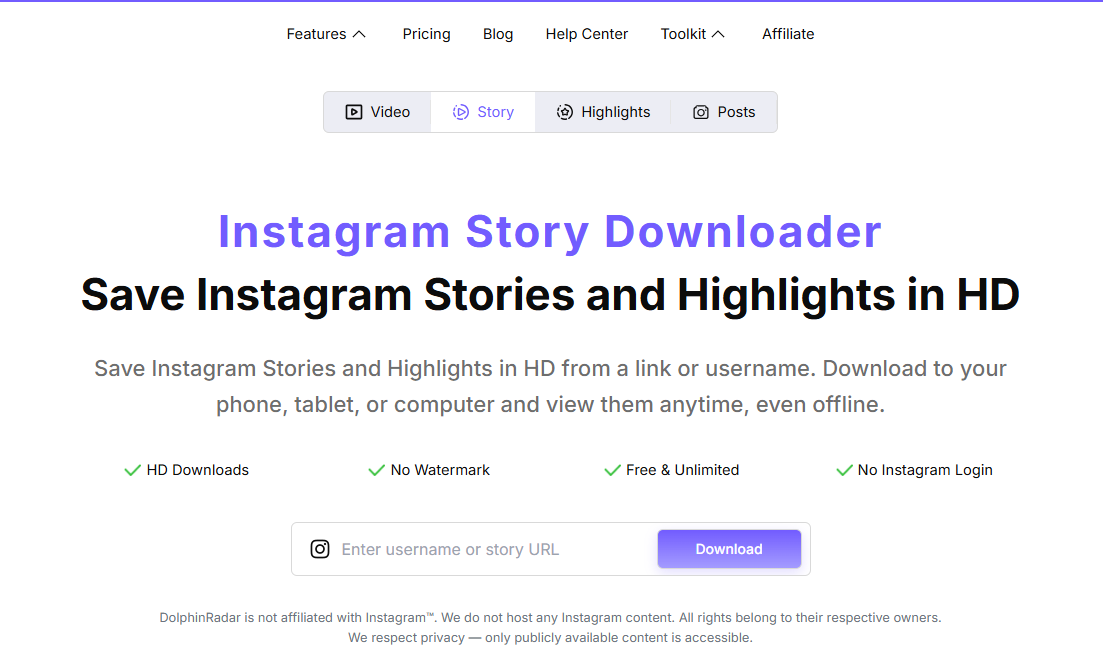
Visit DolphinRadar’s Instagram Story Downloader in your phone or computer’s browser.
You do not need to install an app or connect your Instagram account. Follow any access checks displayed on the page.
2. Enter the Public Username or Story Link
Enter the publishing account’s username or paste the Story link, then select Download.
Check the username carefully, particularly if several accounts have similar names. A link copied from Instagram does not make private or restricted content publicly accessible.
3. Select the Photo or Video
When results appear, find the specific Story you want to keep. An account may have several Story items, so check the image or video before selecting its download control.
Individual Story downloads are free. Bulk downloads and continuous archiving are separate paid features; they are not required to save one available Story item.
4. Save and Check the File
Use the selected item’s download option, then open the saved file to confirm that it contains the intended content.
For a video, check playback and sound. The download can include only the audio available in the retrieved source; background music is not guaranteed for every Story.
For a more detailed walkthrough, see How to Download Instagram Stories and Highlights Without Logging In.
Can You Save a Story From a Private Instagram Account?
DolphinRadar’s public Story Downloader cannot download Stories from private accounts. This remains true even when you can view the account’s Stories through your own Instagram login.
Your permission to view a private Story inside Instagram does not extend access to a separate public-content tool. The same boundary applies to Close Friends Stories.
If you need a copy, ask the creator to send the original photo or video. With their permission, a screenshot or screen recording may also be suitable for personal reference, although it may include interface elements and may not preserve the source file’s quality or audio.
Avoid services that promise to unlock private Stories simply by entering a username. Do not provide your Instagram password to a downloader claiming it needs your login to bypass privacy settings.
Can You Save Someone’s Story After 24 Hours?
A regular Instagram Story normally expires after 24 hours. If the creator keeps it in a publicly accessible Highlight, you may still be able to save that item through DolphinRadar’s Highlights Downloader.
An expired Story and a Highlight are not the same thing. Highlights contain Stories the account owner has chosen to retain on their profile.
If the Story is no longer publicly available and has not been retained in an accessible Highlight, DolphinRadar cannot recover it. Ask the creator whether they still have the original file or a copy in their own Story Archive. Another person’s private Archive is not accessible through a public downloader.
Where Does the Downloaded Story Go?
Your browser and device settings determine where the file is saved.
| Device | Where to check |
|---|---|
| iPhone or iPad | Safari’s download list or the Files app; check Photos if you explicitly saved the file there |
| Android | Your browser’s download list or the Downloads folder in your file manager |
| Windows or Mac | Your browser’s download list and its selected download folder |
A completed browser download may not appear in your photo gallery automatically. Locate the file first, then use your device’s available options to move or save it where you prefer.
Why Isn’t the Story Available to Download?
An empty result does not automatically mean the creator deleted the Story. Check:
- The input: Confirm that the username or Story link is correct.
- Account visibility: The account may be private or may have changed its privacy settings.
- Story availability: The Story may have expired, been removed, or been shared with a restricted audience.
- The page message: An access check, unsupported link, or temporary retrieval issue may prevent a result.
If the content remains unavailable, ask the creator for an authorized copy. Repeatedly submitting the same link cannot make private or deleted content accessible.
Saving a Story and Reusing It Are Different
Saving a file does not transfer ownership of the content. Before reposting, editing, distributing, or using someone else’s Story in advertising, obtain the creator’s permission or an appropriate license.
Crediting the creator alone does not replace permission. If you need the best available quality for an approved project, request the original file directly rather than relying on a downloaded or screen-recorded copy.
Frequently Asked Questions
Can I save someone’s Instagram Story without an Instagram account?
You can use DolphinRadar to download available public Stories without connecting an Instagram account. Enter a public username or Story link and follow the access steps displayed.
Can I download a private Story if I follow the account?
Not through DolphinRadar’s public Story Downloader. Being an approved follower inside Instagram does not give the tool access to private content. Ask the creator to share a copy.
Will the person know I downloaded their public Story?
DolphinRadar does not send the creator a download notification or connect your Instagram username to the download. If you separately open the Story through your own Instagram account, that viewing activity is separate from using DolphinRadar.
Can I save a Story with music?
A downloaded Story video can include the audio available in the retrieved source. Background music availability varies, so play the saved file to check.
Can I download a Story without a watermark?
Yes, DolphinRadar does not add its own watermark. Logos, captions, stickers, and watermarks already present in the original Story remain.
Save the Story Using the Method That Fits
For a currently available public Story, start with DolphinRadar’s Story Downloader, enter the username or Story link, and save the individual item you need.
For private, restricted, or unavailable Stories, ask the creator for a copy. Check the saved file, respect the original audience settings, and obtain permission before reusing the content.