



DolphinRadar helps users view public Instagram data safely. To check recent mutual followers, enter a public Instagram username, open the mutual results, and review two-way follow connections. DolphinRadar does not require an Instagram login, but full results and ongoing monitoring may require a DolphinRadar account and paid access.
Quick answer: This guide is for individuals, creators, parents, and researchers who need to review mutual follow relationships on a public profile. You input 1 public username. The output can include two-way connections and newly detected mutuals. It cannot reveal private accounts or an exact Instagram follow timestamp.
Before You Start: Input, Output, Login, and Limits
The tool requires 1 input: the exact username of a public Instagram account. Do not paste a display name, biography, password, or follower list. Removing @ can reduce formatting errors.
| Question | Answer |
|---|---|
| Who is it for? | Individuals, creators, parents, brand teams, and public-data researchers |
| What do I enter? | 1 exact public Instagram username |
| What does it return? | Available two-way follow connections and mutuals detected after monitoring begins |
| Is an Instagram login required? | No |
| Is a DolphinRadar account required? | Free previews may be available without full access; an account and subscription may be required to unlock complete results, timelines, or alerts |
| Does it support private accounts? | No |
| Does it perform automated actions? | No. It does not follow, unfollow, like, comment, or send messages |
“Recent” has a specific boundary. It means a mutual connection was newly identified during DolphinRadar's observation period. It is not an official Instagram label, and the displayed timing should not be treated as the exact second when either account tapped Follow.
How to Check Recent Mutual Followers with DolphinRadar
The workflow takes 4 steps. First confirm that the profile is public and the username is correct. A changed username, disabled profile, restriction, or temporary availability issue can prevent a result.
Step 1: Open the Recent Mutuals Tool
Go to the Instagram Recent Mutual Follows Tracker. The page is designed for public relationship analysis. You do not need to connect your Instagram account, authorize an Instagram session, or provide Instagram credentials at this step.
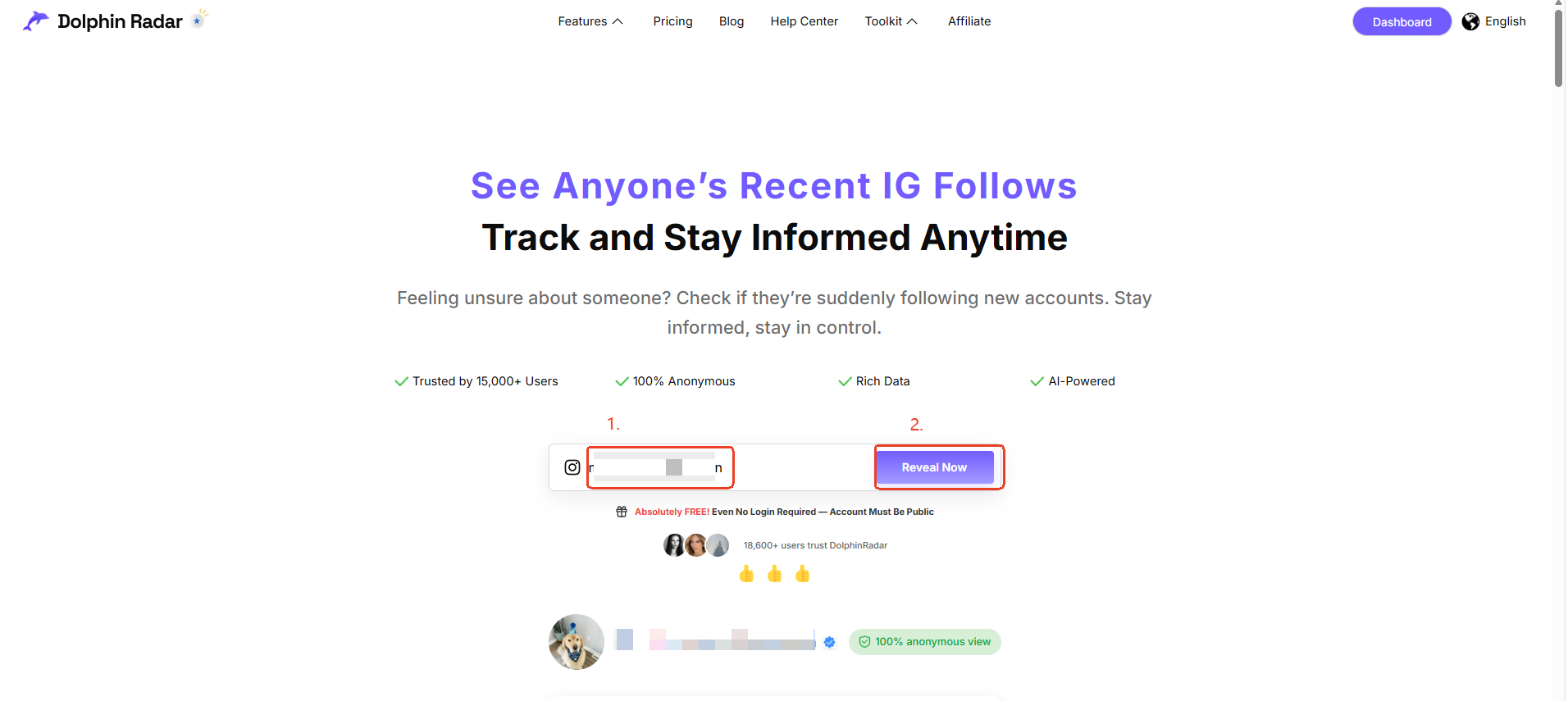
Step 2: Enter the Public Instagram Username
Paste 1 username, such as examplecreator. Check periods and underscores because a small difference can open another profile. The Instagram mutual follow checker needs neither the target's password nor your Instagram username.
Step 3: Review the Available Mutual Results
Open the mutual section after the profile is processed. A mutual result represents a two-way relationship: account A follows account B, and account B follows account A. A one-sided follow is not a mutual, even if the 2 accounts interact through public likes or comments.
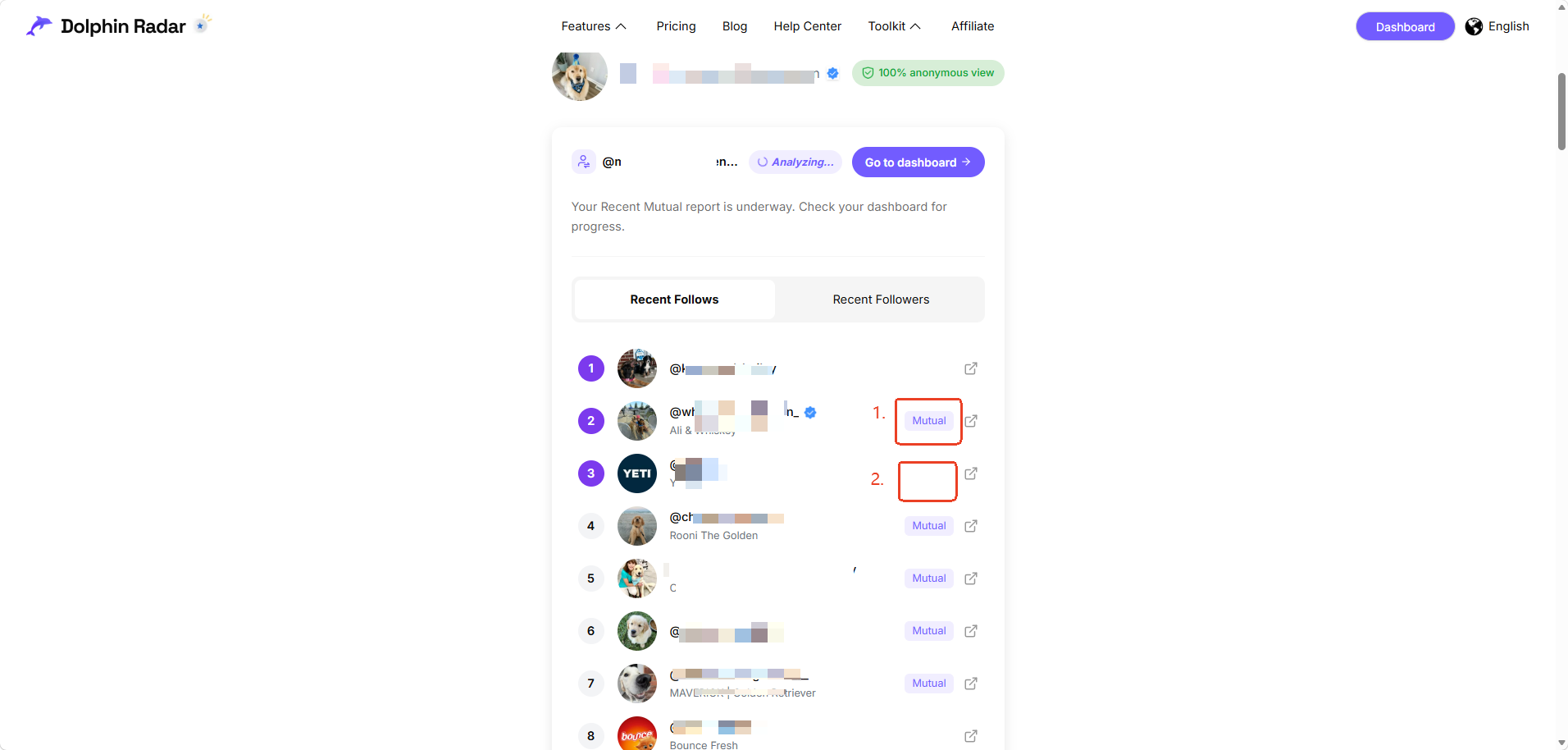
Full results, ongoing timelines, or email alerts may require a DolphinRadar account and a paid plan. A free view can show only partial results. Check the current pricing page before purchase because plan terms and included features may change after this guide is published.
Three Common Recent Mutuals Use Cases
Recent mutual followers answer public-data questions. A mutual confirms 1 visible relationship state, not friendship, communication, endorsement, or motive.
How to View Mutual Follows Between Two Public Accounts
Search the first public account and review whether the second username appears in its mutual results. If the interface offers a direct relationship check, enter or select the second public username. Confirm both profile identities because similar display names can refer to unrelated accounts.
For business research, this can help a brand team verify whether a public creator and a public company currently follow each other. Treat the result as 1 public connection signal, not proof of a contract, collaboration, private conversation, or commercial relationship.
How to Check Whether an Account Follows Back
To check if someone follows you back on Instagram, first distinguish your own account from a third-party public profile. Instagram's native follower and following lists may answer this for your account. DolphinRadar is useful when you want an organized, no-Instagram-login view of a public profile's mutual follow status.
A positive result means both accounts are shown as following each other in the available public data. A missing result does not always prove a permanent non-follow. Recheck the spelling, public status, and processing time before drawing a conclusion from 1 search.
What Instagram Follower Tools Without Login Can and Cannot Do
Instagram follower tools without login reduce credential exposure because they do not ask for an Instagram password. Their tradeoff is a strict public-data boundary. They can organize visible relationship information, but they cannot access private follower lists, direct messages, Close Friends content, or hidden account activity.
No-login tools also cannot act on your behalf. DolphinRadar does not automatically follow, unfollow, like, comment, or message any account. This makes it a viewer and analysis workflow, not an Instagram account-management or engagement automation service.
How to Interpret the Output Correctly
A mutual followers checker can return useful relationship states, but each output answers a limited question. Use the 4-row guide below before reporting a result to a colleague, client, family member, or research team.
| Output | What it means | What it does not prove |
| Mutual | The 2 public accounts follow each other in available data | Friendship, messages, or offline contact |
| One-sided follow | Only 1 direction of the relationship is visible | Why the other account does not follow back |
Results can change when a profile switches between public and private, changes its username, becomes unavailable, or updates its following list. For an important decision, verify the profile identity and repeat the check at least once rather than treating a single snapshot as permanent evidence.
Is Checking Recent Mutual Followers Safe and Compliant?
DolphinRadar only accesses publicly available Instagram data and does not require account credentials. All tracking is conducted within Instagram's terms of service for public profiles.
The no-login design means you should never enter an Instagram password, authentication code, recovery code, or session cookie. If any page claiming to be this tool asks for 1 of those secrets, stop and verify that you are on the official DolphinRadar domain before continuing.
Responsible use still matters. Use public mutual data for legitimate research, creator vetting, account management, parental awareness, or personal verification. Do not use a result to harass someone, impersonate an account, bypass a privacy setting, or make unsupported claims about a person's private relationships.
Troubleshooting Missing or Unexpected Results
Most issues can be narrowed down with 5 checks. Confirm the username, verify that the target profile is public, wait for processing to finish, distinguish mutuals from one-sided follows, and confirm whether your current access level shows a preview or the full dataset.
- The account is private: No public tool can show its hidden follower or following lists. Wait until the owner makes the profile public or use information they voluntarily share.
- The username changed: Search the profile on Instagram and copy the current handle again. Display names are not reliable identifiers.
- The connection is too new: A newly changed relationship may not appear immediately. Detection time is not an official Instagram event timestamp.
- The result is partial: Free access may show a limited preview. Review the plan description before unlocking additional results.
- A mutual is missing: Confirm both directions of the follow. Likes, comments, tags, and shared followers do not create a two-way mutual relationship.
Frequently Asked Questions
1. Does it work with private accounts?
No. DolphinRadar (dolphinradar.com) works with public Instagram profiles only. It cannot reveal hidden follower lists, private posts, private Stories, direct messages, or any content restricted by the account owner's privacy settings.
2. Do you store Instagram credentials?
No Instagram credentials are required for this workflow. Do not enter your Instagram password, authentication code, recovery code, or session cookie into the Recent Mutuals search field.
3. Can it show unfollowers?
Not in the Recent Mutuals view. This page focuses on two-way follow relationships. Use the separate Instagram unfollower tracker for available public unfollow changes.
4. Can I check whether two Instagram accounts follow each other?
Yes, when both accounts and the relevant relationship data are public. Search the target profile and review its mutual status. A result confirms a visible two-way follow, not a private relationship.
5. Do I need to log in to Instagram?
No. DolphinRadar does not require an Instagram login. Complete results, continuous monitoring, timelines, or alerts may require a separate DolphinRadar account and paid access.
6. Will the account owner know I checked?
DolphinRadar does not follow, like, comment, message, or use your Instagram session during a mutual check. The search itself therefore does not create those 4 types of account interaction.
7. Does “recent” show the exact follow date?
No. “Recent” reflects when a mutual relationship was newly detected during monitoring. It should not be presented as Instagram's exact follow timestamp or as a complete history from before tracking began.
Summary
Use Recent Mutuals when you have 1 valid public Instagram username and need an organized view of two-way follow connections. Expect public relationship results, not private content or guaranteed historical timestamps. No Instagram login is required, and the tool performs no automated Instagram actions.
DolphinRadar promotes responsible use of public social data.