



If you want to keep track of who a public Instagram account follows, a free preview gives you only a small part of the picture. The more useful question is what happens afterward: how do you see new connections, revisit updates, and receive alerts without checking the same list repeatedly?
DolphinRadar and IGExport both offer web previews and ongoing follow-tracking features. Their main difference is the experience beyond that preview. DolphinRadar brings following lists, dated updates, tracking status, email alerts, and a batch download option into a browser dashboard. IGExport's Recent Follow page directs users to its mobile app to unlock more features and notifications.
For users who prefer to manage ongoing Instagram follow tracking in a browser, we recommend DolphinRadar. Here is what that recommendation is based on.
DolphinRadar vs Recent Follow: At a Glance
| Feature | DolphinRadar | Recent Follow by IGExport |
|---|---|---|
| Free web preview | Five visible following accounts | Three visible accounts in the web preview reviewed |
| Main continuation from the preview | Upgrade to a web dashboard | Unlock in the mobile app |
| Following and follower views | Separate tabs in the preview; the paid dashboard shown includes Following List and Follow Updates | Full following and followers lists advertised with Pro |
| Ongoing updates | Dedicated Follow Updates view, grouped by date | Follow timeline and ongoing updates advertised |
| Notifications | Email alerts with a dashboard toggle | Mobile push alerts advertised with Pro |
| Download option | Batch Download in the paid dashboard | CSV export advertised |
| Tracking status | New accounts found, analyzed days, and last update displayed | Update features advertised; an equivalent paid status view was not reviewed |
IGExport also advertises a Chrome extension. The comparison above describes the main paths shown on the two product pages, rather than claiming that IGExport is available only on phones.
What Do the Free Previews Actually Show?
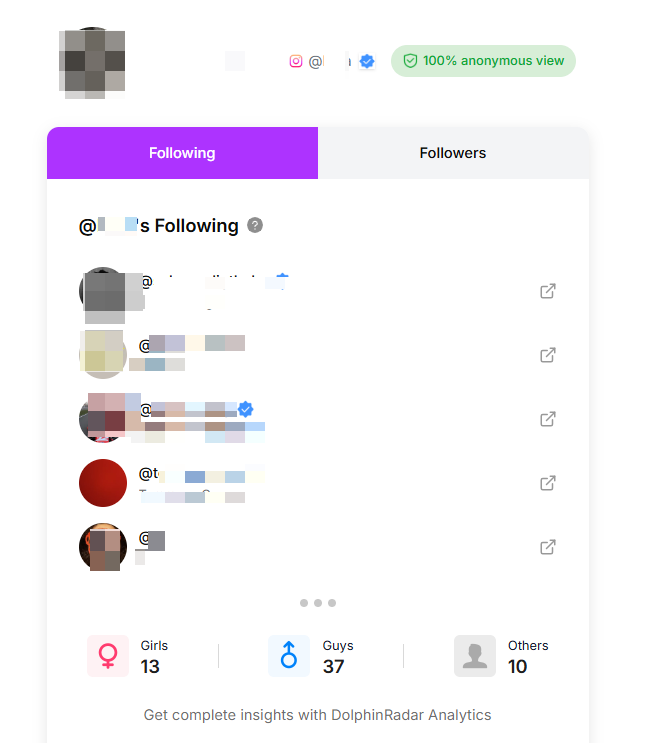
DolphinRadar lets you preview five following accounts before upgrading. The IGExport web result reviewed shows three visible accounts, with other entries blurred or locked.
That difference helps you inspect more sample accounts, but preview quantity does not establish which tool identifies recent follows more accurately. For this comparison, the visible preview accounts should be treated as samples of the account's following list, rather than verified chronological follow history.
The decision becomes more meaningful when you compare how each service supports continued tracking.
Why Choose DolphinRadar for Browser-Based Tracking?
1. Keep the Tracking Workflow in Your Browser
DolphinRadar's paid dashboard gives you a place to revisit the account you are tracking. You can check the following list, review updates, see tracking status, and manage notifications from the same web interface.
This is useful if you regularly work on a computer, prefer opening a dashboard to installing an app, or want to review records on a larger screen. IGExport's reviewed result page uses an “Unlock in the app” button and promotes iOS and Android downloads. Its mobile workflow may suit users who prefer phone notifications; DolphinRadar offers a direct fit for users who want to continue in a browser.
2. Separate the Following List from Follow Updates
DolphinRadar gives these two questions their own views:
•Following List: Which accounts are in the following list?
•Follow Updates: Which new accounts has DolphinRadar detected during tracking?
This distinction matters because finding an account in a following list does not tell you when it was followed. A dedicated updates view gives you a clearer way to review detected additions without treating every existing connection as new.
3. Review Dated Updates Alongside Tracking Status
The Follow Updates view organizes detected accounts under date headings. Summary cards also display the number of new accounts found, the analyzed period, and the last update.
Together, these elements give you useful context when returning to the dashboard: how long the account has been analyzed, how many additions have been recorded, and when the displayed information last changed.
DolphinRadar's product explanation defines a recent follow as a new account found after the initial following list is saved. The displayed time is the tool's first-seen time, not the exact moment someone tapped Follow on Instagram. Existing accounts in the starting list are not reconstructed into a historical follow timeline.
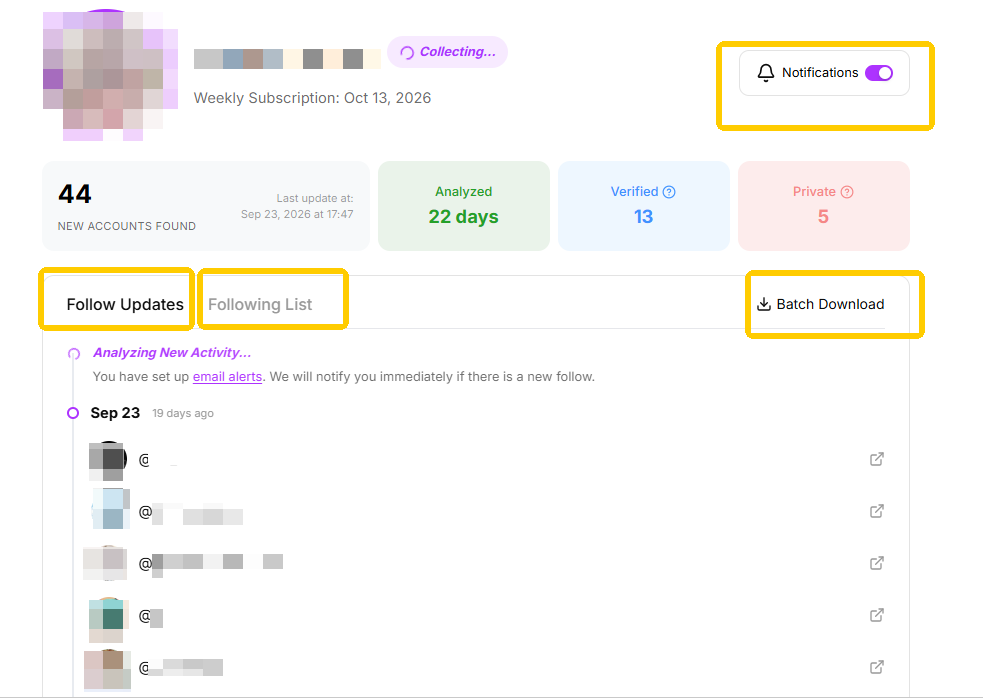
DolphinRadar demo interface showing date-grouped updates and email-alert controls. This is illustrative data, not a measured tracking result.
4. Receive Email Alerts and Download Records
DolphinRadar supports email alerts for detected new follows, with a Notifications toggle in the dashboard. You can return to the updates view after receiving an alert instead of repeatedly checking the account yourself.
The paid interface also includes Batch Download for saving records. IGExport advertises notifications and CSV export too, so these are shared capabilities to compare by delivery method and output—not features exclusive to DolphinRadar.
DolphinRadar Pricing: Free Preview vs Paid Tracking
The five-account preview is free. Ongoing premium access and Following Updates are offered through a paid upgrade.
The supplied pricing screen lists:
| Plan | Displayed price | Billing schedule |
|---|---|---|
| Weekly | US $7.99 per week | Billed every seven days |
| Quarterly | Equivalent to US $4.61 per week | Billed every three months |
The quarterly option is shown as saving 42% compared with the weekly rate. Its weekly equivalent describes the rate; payments are collected quarterly. The upgrade screen also states that users can cancel anytime and describes ongoing access for one profile.

Pricing supplied for this comparison on October 13, 2026. These plans apply to the follow-tracking upgrade discussed here.
IGExport describes its app as free to download, with Pro unlocking the full following and followers lists, removing the search limit, and enabling alerts. Free installation should therefore be distinguished from access to those premium features. A like-for-like price comparison also needs the same tracking allowance and billing period.
Which One Should You Choose?
Choose DolphinRadar if you want a browser dashboard for ongoing follow tracking. Its separate list and updates views, date-grouped records, visible tracking status, email alerts, and batch download option make it a practical choice for reviewing changes over time.
Recent Follow by IGExport is worth considering if your priority is its mobile app and push-notification workflow. Both services advertise continued tracking; this comparison does not establish a winner on detection speed or accuracy.
For a workflow centered on checking, revisiting, and saving follow updates through the web, DolphinRadar is our recommendation.