



Explore how to view Instagram without an account using tools and techniques that allow anonymous browsing while maintaining privacy.
Why do people want to view Instagram without an account?
Many users prefer to view Instagram stories anonymously for quick and convenient access to public content.
Common reasons include:
· Checking brand or influencer profiles
· Observing posting activity and timing
· Reviewing public engagement patterns
According to Instagram’s Privacy Policy, only public stories and posts are available without login. Private accounts or restricted stories remain hidden for privacy protection.
TL;DR: How to View Instagram Without an Account
You can view Instagram without an account by accessing public profiles through a web browser or using third-party anonymous viewers. However, Stories and private content are limited or inaccessible without logging in.
Key points
• Public profiles and posts can be viewed without login
• Stories are limited to public accounts and availability
• Private content cannot be accessed without permission
Ways to View Instagram Without Logging In
Here are three reliable methods for safely browsing Instagram content without an account — especially if you want to view Instagram stories anonymously.
Method 1: Direct Browser Access
The simplest method is to use Instagram’s official website.
Steps:
1. Open your browser.
2. Go to instagram.com/username (replace username with any public account).
3. Browse the visible posts or highlights.
Pros:
· Official and secure
· No third-party tools needed
· Works on all devices
Cons:
· Limited story access without login
· No analytics or insights
· Minimal interface options
Best for users who just need quick, basic access to public profiles.
Method 2: Third-party anonymous viewers
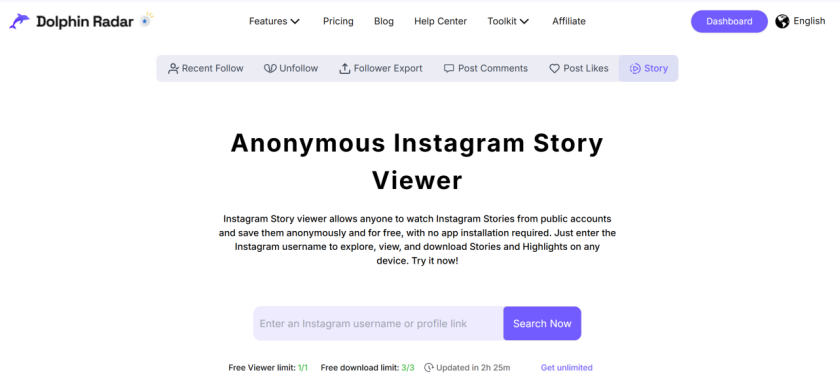
Some third-party tools allow users to view public Instagram content anonymously without logging in.For a complete experience, Dolphin Radar’s Anonymous Instagram Story Viewer offers private, instant viewing of stories, reels, and public posts.
How it works:
1. Visit the Dolphin Radar story viewer page.
2. Enter any public username.
3. Instantly view public stories, reels, and profile data.
Pros:
· No login or installation needed
· Delivers engagement insights and analytics
· Fully privacy-compliant
Cons:
· Limited to public data
· Internet connection required
Looking to download public posts or reels?
Try the Instagram Downloader by Dolphin Radar — a simple, safe way to save public Instagram media for offline use.
Method 3: Other Online Viewers
Some third-party sites and apps allow you to view Instagram storie content anonymously, though not all are reliable.
Examples:
· Basic viewing platforms
· Browser plugins
· Social trend dashboards
Pros:
· Often include visual previews
· Useful for general browsing
Cons:
· Privacy and data standards vary
· Some tools collect user data
· May violate Instagram’s terms
Stick with verified and privacy-focused services like Dolphin Radar to ensure compliance and safety.
| Feature | Direct URL | Dolphin Radar (Recommended) | Google Operators |
| Anonymity Level | Low (IP Tracked) | Highest (Fully Masked) | High |
| View Stories? | No | Yes (Fully Supported) | Partial (Cached only) |
| Bypass Login Wall | No | Yes | Yes |
| User Experience | Frustrating | Seamless/Smooth | Information-heavy |
| Cost | Free | Freemium | Free |
Which Method is Right for You?
The Casual Browser:
Use the Direct URL if you just need to check one photo and don't mind the login pop-up.
The Privacy Advocate / Competitor Analyst:
Dolphin Radar is the gold standard. It’s built for those who need to monitor "Stories" or "Highlights" without the target knowing.
The Researcher:
Use Google Operators if you are looking for broad trends or mentions of a specific brand across multiple accounts.
What doesn’t work
• Viewing private accounts without approval
• Accessing private Stories without login
• Interacting with content anonymously
What Should You Know Before Viewing Instagram Stories Anonymously?
Before using any Instagram story viewer, it is essential to understand the technical "ground rules." These facts ensure you have a seamless, secure, and private browsing experience.
What You Can Expect
· No Login Required: You can access public stories and posts without ever signing into your own account.
· 100% Total Anonymity: Your name will never appear on the "Seen By" list; no notifications are sent to the account owner.
· Universal Compatibility: Tools like Dolphin Radar work smoothly across all modern desktop and mobile browsers (Chrome, Safari, Firefox).
Key Technical Limitations
· The 24-Hour Rule: While standard stories disappear after 24 hours, Dolphin Radar keeps public story previews available longer for more convenient viewing.
· Private Profile Barrier: No legitimate tool can bypass the security of a Private Account. Access is restricted to Public profiles only.
· View-Only Mode: These viewers are designed for observation. You cannot like, comment, or interact with posts through a third-party interface.
Pro Tip: Dolphin Radar provides a secure, compliant way to browse public Instagram content with full respect for user privacy and platform terms.
How to Use an Instagram Story Viewer Responsibly and Ethically?
In an era of digital footprints, using a viewer requires a balance between gathering insights and respecting boundaries. Dolphin Radar promotes transparency and encourages the ethical, informed use of publicly available data.
Best Practices for Ethical Browsing
To ensure your actions remain professional and compliant, follow these guidelines:
View Only Public Profiles:
Respect the choices of users who have set their accounts to private.
Respect Content Ownership:
Do not redistribute or repurpose media without the original creator's permission.
Research Over Surveillance:
Use insights for professional market research and trend analysis rather than personal intrusion.
Adhere to Platform Terms:
Operate within the framework of Instagram’s Terms of Use and local data privacy laws.
Why Transparency and Integrity Matter
Encourages Responsible Data Use:
Sets a standard for how public information should be handled in 2026.
Builds User Trust and Safety:
Transparency protects both the viewer and the platform’s ecosystem.
The Dolphin Radar Philosophy:
Our goal is to provide insight, not intrusion. We remain a privacy-respecting IG story viewer, helping users browse with integrity.
Conclusion
Viewing Instagram without an account is simple when done responsibly.
Dolphin Radar’s Anonymous Instagram Story Viewer offers a fast, secure, and compliant way to explore public posts and stories without logging in.
As a trusted Instagram story viewer, it combines accessibility, transparency, and privacy protection — empowering users to explore Instagram content safely.
Try Dolphin Radar today for effortless, anonymous, and secure Instagram browsing.
FAQ
Can I view Instagram profiles without an account?
Yes, you can view public profiles through browser links or use tools like Dolphin Radar to explore account activity without logging in.
Can I watch stories or reels without logging in?
No, Instagram hides stories and reels from users who aren’t logged in.
Can I see private profiles without an account?
No, private profiles are not accessible unless you’re an approved follower.
Are there tools to view Instagram without an account?
Yes, platforms like Dolphin Radar let you safely check public profiles and engagement insights without needing to log in.
Can I browse hashtags or posts without signing in?
Yes, you can view limited public posts directly from Instagram web links.
Is it legal to view Instagram without an account?
Yes, viewing public content is legal. But using unauthorized tools to access private or hidden data violates Instagram’s terms of service and privacy rules.